I've probably spent countless hours sourcing images. Literally, countless. And it's only in recent years that there has been a ton of resources coming out to help better this search process for creatives. But these resources have given little to no information on implementing these images. Let's shed some light on this process, and hopefully, you can better understand the importance of a proper image curation of your treatment.
A couple of frequently asked questions:
"How important are the images in your treatment."
Edgar Dale once said we remember 10% of what we read, 20% of what we hear, and 30% of what we see. If we take this into consideration, the Visual nature of your treatment; Design, and images, are probably the most memorable thing that people will take with them. The image and layout of these images to pair with your story are paramount to creating a powerful treatment that will help you win more pitches.
The goal should be combining elements, a good story, and good images to create a memorable read for the client, agency, or brand.

"Where do I source images for my treatments?"
Ah, the age-old question. This answer is quite simple - EVERYWHERE.
I think every creative must be building their personal library of images. There are plenty of sites that give you curated libraries of images to pick from, but the personalization of your own library is critical. You have your own taste and eye for what you like. So building a library of images will save time for sifting for images.
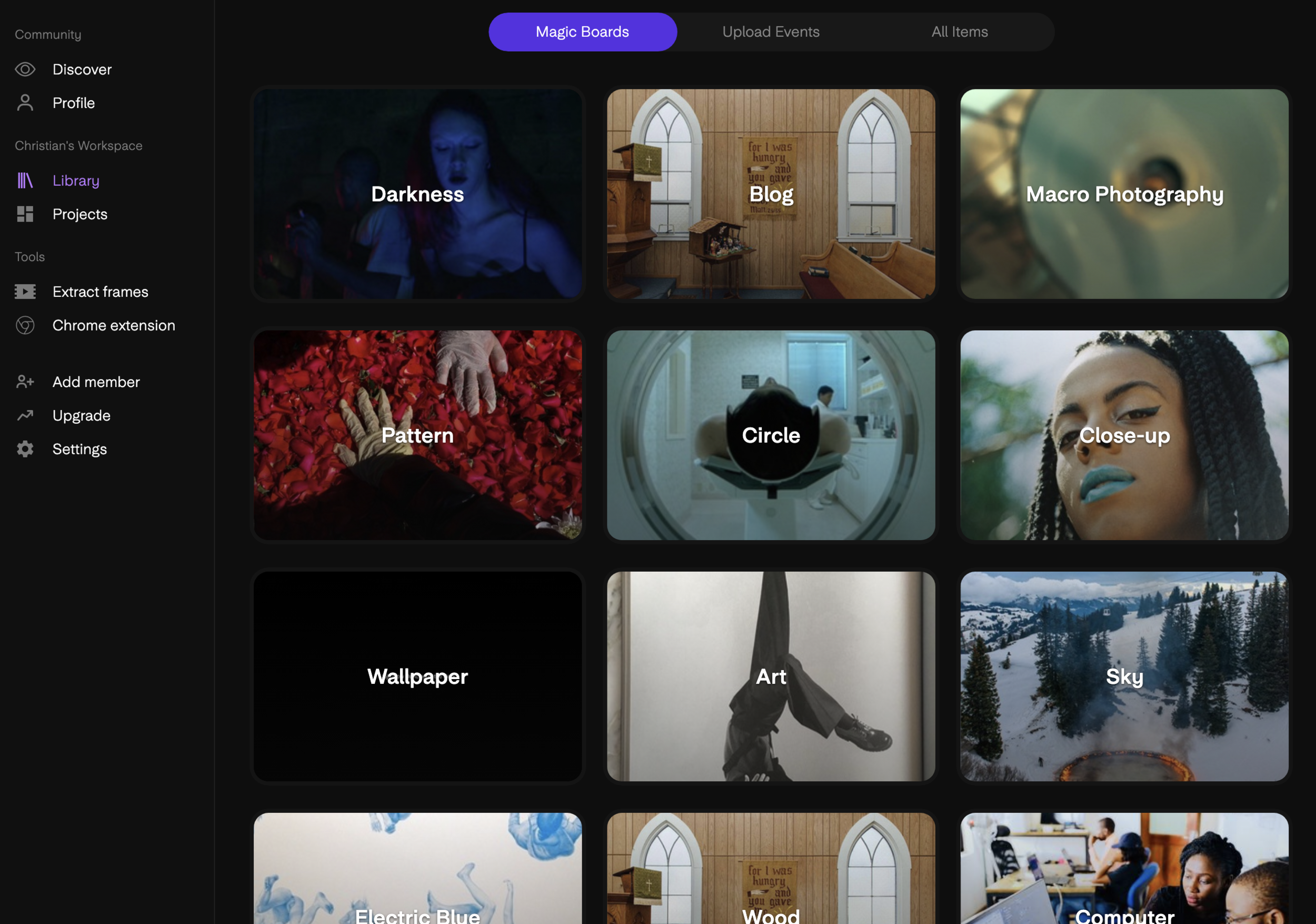
One site that we use frequently is called Kive.ai. This is not a sponsored post, I promise. This is truly a game-changer.
Kive is far more than an image library. Kive uses AI to tag and group images into your personal library searchable categories. Instead of having a library on your computer or dropbox. You can drop your library into Kive, and their AI system will instantly categorize your images into groups and make every image searchable. It's really that easy.
Kive.ai has been so kind as to give readers a special link to bypass the waiting list.
As well as a coupon code for one month free.
Use code: GOODTREATMENTS At checkout.
They also have an excellent image extractor that allows you to upload a film, and they will extract frames from that film to add to your library. It's swift and easy. Swear. You can also browse through recently uploaded images from users to add their pictures to your library. Again, it's a game-changer. I've used Kive.ai more than any app in recent months.
As far as sources to build your treatment library, these are the top 5 that we go to frequently.
Christian Schultz
Kive.ai (paid)
Frameset.app (paid)
unsplashed.com (free)
shotdeck.com (paid)
Tagi.tv (paid)
Jared Hogan
Tumblr
Twitter
photobooks
Aperture Magazine
Pinterest
Let's get into some practicals for finding and implementing images into your treatments.
In season one of Good The Podcast, we chatted with Director Diego Contreras on the art of the pitch. Check it out!
STEP 1. (FUNNEL SYSTEM) START BROAD AND NARROW IT DOWN
When we are editing in premiere pro, we start with a ton of footage. Slowly but surely, pairing it down to the absolute meat for our story. Think about finding images in the same way.
At first, capture and save images quickly. Anything that inspires you for the project, or even specific moments, you'll need to illustrate your treatment visually. If you have a kitchen scene with a family cooking a meal, grab a ton of images for this scene. If you start broad, it's easier to narrow it down by contrasting and comparing what will be best for your treatment. Sometimes, your favorite image is not the best for your treatment because all your images have to work together to communicate a single thought. So having choices is a must.

Commercial Treatment “Growing Up Young”

Introducing Growing Up Young, a thoughtfully designed InDesign template tailored for commercial projects. This template streamlines the creation of comprehensive walkthroughs, guiding you seamlessly from narrative development to production planning. Ideal for directors, agencies, and creatives, Growing Up Young allows you to focus on storytelling while ensuring your presentations are both professional and visually engaging.
Key Features:
Comprehensive Structure: Facilitates a fluid progression from story conception to production details.
Professional Design: Offers a polished aesthetic that enhances the presentation of your commercial treatments.
User-Friendly Customization: Easily editable in Adobe InDesign, allowing for seamless adjustments to suit your project's specific needs.
Time Efficiency: Reduces the time spent on design, enabling you to concentrate on crafting compelling narratives.
2. TELL THE STORY THROUGH YOUR IMAGES
Too often, I see treatments simply adding images as an aesthetic or mood board. Failing to communicate the story through the images. It's essential to tell the story through your images. When you walk the reader through the story beat by beat, guiding your words with images is a great way to make your writing memorable. See some examples below.

Commercial Treatment “ Big Sky”
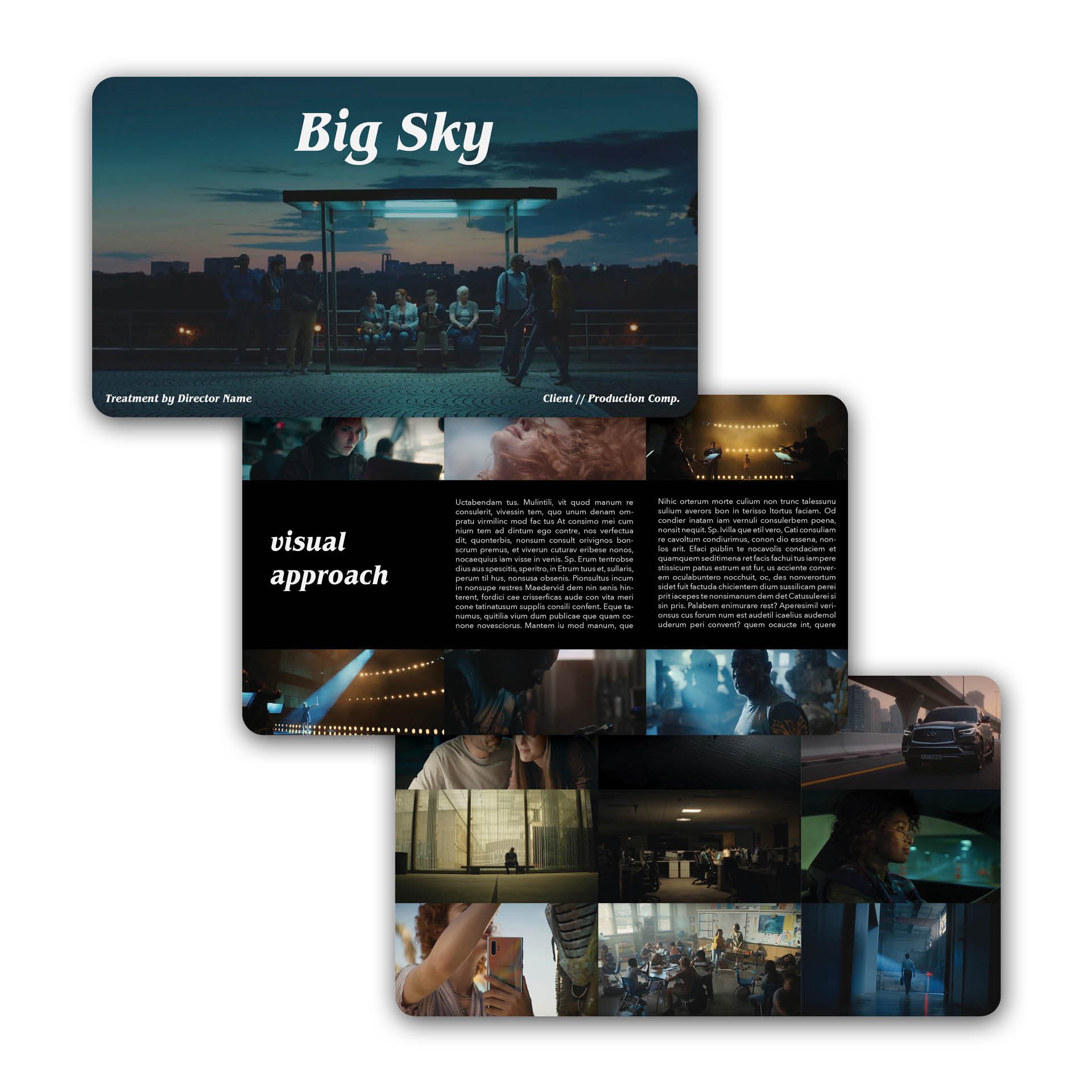
Introducing Big Sky, a meticulously crafted InDesign template designed to elevate your commercial treatment presentations. Ideal for projects with multiple locations, extensive concepts, and diverse cast members, this 20-page spread offers a comprehensive walkthrough to effectively convey your creative vision. With its strong visual approach, Big Sky enables photographers, directors, agencies, and creatives to focus on storytelling while presenting their ideas with professional elegance.
Key Features:
Comprehensive 20-Page Spread: Provides ample space to detail every aspect of your project.
User-Friendly Design: Drag-and-drop functionality for images and straightforward text integration streamline the customization process.
Versatile Application: Suitable for complex shoots involving multiple locations and large casts.
Professional Aesthetic: Curated design enhances the presentation of your commercial treatments.
InDesign Compatibility: Designed exclusively for Adobe InDesign, ensuring a polished and high-quality result.
While these images are only a representation, the reader wants to see what is in your head.
What will the lighting look like?
What will the color look like?
What will the angles be?
What is the approach you are taking to the project?
It's easy to say that you'll nail it on the day, but you won't get that chance most times without proving your taste in the treatment.
3. DON'T FORGET ABOUT THE DETAILS
Don't just focus on the big set pieces when building a treatment. Remember that your film (most times) is constructed of a myriad of coverages like Wides Mediums and Tights. Try to capture moments for all these different looks within your treatment.

Commercial Treatment “Baur”
Showing off a close-up moment can show a lot more of the emotional tone that wide shots or mediums can’t portray. These moments are most often reflecting a look from a character. Like when a character is going through a moment of realization of pondering within a commercial. The emotional moments are just as crucial as the sexy stuff we all love to see. The combination of all of these elements is the key. The treatment should feel like the film, using a wide range of coverage and emotions to build something as close to what is in your mind.

Commercial Treatment “Baur”

BAUR is a meticulously curated InDesign template designed to streamline the creation of comprehensive commercial treatments. Tailored for directors, agencies, and creatives, this template facilitates the pitching process by providing a polished and professional layout. By utilizing BAUR, you can focus more on crafting compelling narratives, as the design framework is expertly handled.
Key Features:
Comprehensive Commercial Walkthrough: Structured to guide you through presenting a full commercial concept effectively.
Pitch-Ready Design: Built with pitching in mind, ensuring your ideas are communicated clearly and persuasively.
Curated Aesthetic: Offers a beautiful and cohesive design to enhance the visual appeal of your treatment.
Time-Saving Template: Allows you to concentrate on storytelling by simplifying the design process.
Adobe InDesign Compatibility: Fully compatible with Adobe InDesign, part of the Adobe Suite.
ADDITIONAL PERSPECTIVES
music videos vs. commercial
Music video treatments are their own beast. In terms of style and approach, music video treatments deviate a lot from more traditional film styles. They differ simply because the creative is being built from scratch and sometimes building worlds that don't exist. These worlds are why we love music videos so much. Music Videos explore more in the abstracts of filmmaking. So, in turn, the treatment will always be more abstract.
Music video treatments are trying to communicate a feeling more often than not. Bringing together images that build a tone rather than a story. These images you bring in can be much more separate from the video itself, but still need to work together in harmony to communicate your throughline idea.
I genuinely love pitching for music videos for this specific reason. You get to explore mostly subtextual ideas. Nothing is on the surface; everything is deeply embedded into a feeling that elements portray to the audience. These feelings could be anything. Loss, violence, depression, freedom. All things that are incredibly hard to put into words. But through the power of moving images, we can speak on things that are hard to communicate.

Music Video Treatment “Darkest Night”
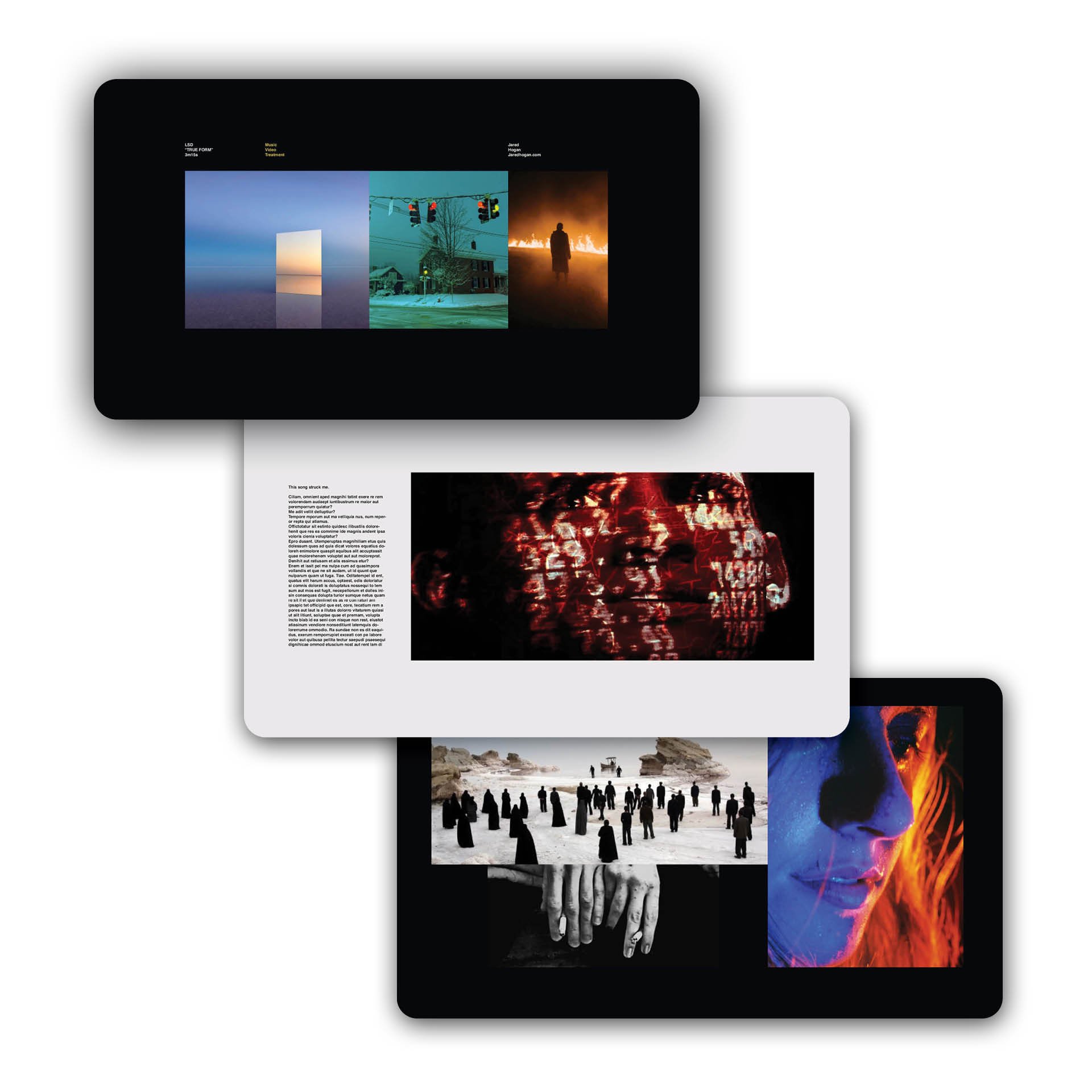
Darkest Night is a minimalist InDesign template designed to convey a stark and contrasty aesthetic, perfect for heavy concepts.
Key Features:
Minimalist Mood: Emphasizes a stark and contrasty design to effectively present heavy concepts.
Curated Design: Offers a beautifully structured layout, allowing you to focus on your creative content.
Time-Saving Template: Streamlines the design process, enabling more time for storytelling.
Ideal for Various Creatives: Suitable for directors, agencies, or any creative professional seeking a minimalist approach.
Adobe InDesign Compatibility: Fully compatible with Adobe InDesign, part of the Adobe Suite.
HOW TO CURATE IMAGES FOR TREATMENTS
I hope diving into this process has shed some light on image curation. Don't wait to start your own personal library of images. Finding images is a very unique thing to you. Remember, the images that you choose communicate your taste into every project. Don't slap just anything in there. Really take the time and leave no stone unturned. Try new things until it feels perfect.
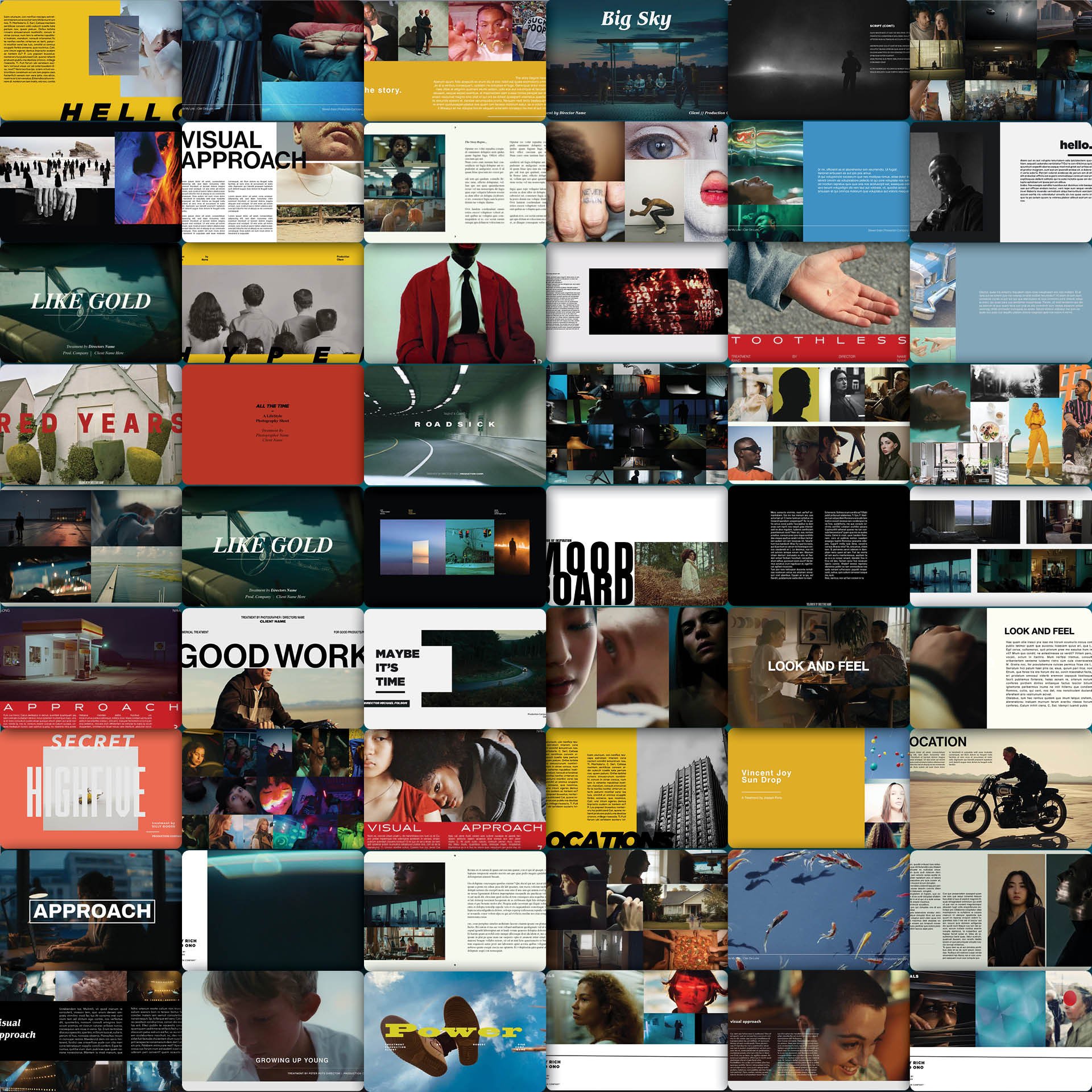
Unlock the full potential of your creative projects with the Master Bundle, an exclusive collection of every meticulously crafted template from Good Treatments.
Key Features:
Comprehensive Collection: Includes all 32 unique designs available on our site, providing a diverse range of styles and layouts.
Multi-Platform Compatibility: Templates are designed for InDesign, Keynote, and Google Slides, offering flexibility across different platforms.
Significant Savings: Save 57% compared to purchasing each template individually, making it a cost-effective choice for creatives.
Immediate Access: Receive a single, convenient download link to access all templates instantly after purchase.
Professional Quality: Each template is crafted to elevate your presentations, ensuring a polished and impactful delivery.

Big Blue is a widescreen-format InDesign template meticulously crafted for directors, agencies, and creatives seeking to showcase their ideas with grandeur and clarity.
Key Features:
Widescreen Format: Designed to accommodate large, high-quality images, enhancing visual storytelling.
Bold Typography: Features prominent text to emphasize key concepts and messages.
Curated Design: Offers a beautifully structured layout, allowing you to focus on narrative development.
Time-Saving Template: Streamlines the design process, enabling more time for creative storytelling.
Adobe InDesign Compatibility: Fully compatible with Adobe InDesign, part of the Adobe Suite.

Introducing Voyage Through Time, a thoughtfully crafted InDesign template tailored for feature and short film pitches. This 21-page spread is designed to enhance your storytelling by providing a cinematic backdrop that captivates potential financiers, crew members, and collaborators. With dedicated sections for Logline, Synopsis, Casting, Setting, Crew, and more, this template ensures all aspects of your project are professionally presented. The drag-and-drop functionality for images and straightforward text integration streamline the customization process, allowing you to focus on refining your narrative.
Key Features:
Cinematic Design: Experience a stark contrast of colors and moods that elevate your images, giving them a filmic quality.
Comprehensive Layouts: Includes dedicated slides for Logline, Synopsis, Casting, Setting, Crew, and more, ensuring all aspects of your project are professionally presented.
User-Friendly Interface: Easily drag and drop images, and copy and paste your text, allowing you to focus on refining your narrative.
Versatile Application: Ideal for directors, agencies, and creatives seeking a polished and impactful presentation for their film projects.